
Review · ICELAND
Iceland: Audioguide, Interactive map 200 spots ++
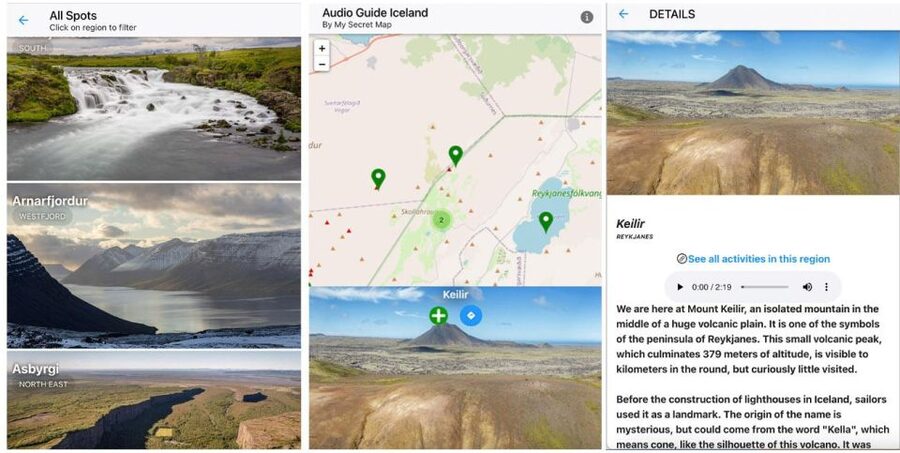
Iceland stories track your exact spot. I like the interactive geolocation map and I love the 200+ spots with 5 hours of audio, but you will need steady internet to make it work.
There is no pickup, so you can start anywhere in the Capital Region, then hop between places using the route suggestions. I also appreciate that every audio track has a text transcript, which is handy when wind and car noise drown your headphones.
The app is good for a self-paced trip, and I found it reassuring that a verified user said support sent a new access quickly after a user mistake. That kind of safety net matters when you are counting on your phone for navigation and stories.
In This Review
- Key highlights at a glance
- Price and what $17 buys you (per group, not per person)
- What this audioguide experience actually feels like
- How the app works: map, geolocation, audio, and text
- The 200+ Iceland spots: how to turn them into a real route
- What to expect at each type of stop
- Storytelling power: sagas, legends, and place meaning
- Nature science chapters: why geysers and geothermal areas feel different with context
- Northern Lights audio: useful context, real-world limits
- Photo opportunities: where the guide helps you save time
- Setup, connectivity, and battery: the practical make-or-break details
- Mobility and starting point: no pickup, wheelchair accessible
- Support and reliability, based on real access experience
- Who should book this audioguide, and who might not love it
- Should you book this Iceland audioguide?
- FAQ
- Do I need an internet connection to use the audioguide?
- Is there a pickup location?
- How many spots are included?
- How much audio content is included?
- What languages are available?
- Is there text available with the audio?
- Do I need headphones?
- How long do I have access after booking?
- Is it wheelchair accessible?
- What should I bring with me?
- Can I reserve now and pay later?
- Can I get a refund after booking?
Key highlights at a glance
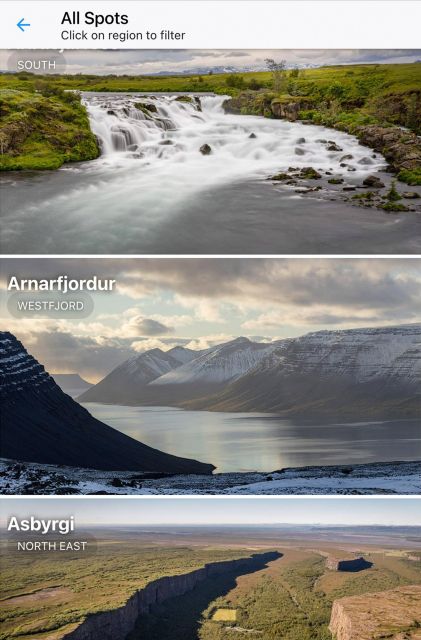
- Geolocation map for real-time orientation so you spend less time searching
- 200+ Iceland spots with about 5 hours of audio content
- Audio plus full text transcripts for quick rereads and easier comprehension
- Itinerary guidance that links nearby stops and offers route options
- Photo recommendations tied to specific places you are visiting
- German, French, English audio with an app setup email after booking
Not settled yet? These other Iceland outings landed on our desk too.


Price and what $17 buys you (per group, not per person)

At $17 per group up to 6, the price makes sense if you are traveling with friends, or if you can share one phone while someone else listens in turns. Self-guided audioguides often price per device, so this group pricing can feel like a small bargain if you are not solo.
You are paying less for the experience itself, and more for the planning and context that usually takes extra time. With 200+ spots and route help, you are buying a way to move through Iceland with fewer detours and more meaning at each stop.
The main value question is your comfort with a phone-based system. If you dislike apps, or you hate relying on data in remote areas, you might feel the cost is not matched by convenience. If you like to drive, walk, and choose your own pace, this guide can turn a random day of sightseeing into something more connected.
What this audioguide experience actually feels like
This is not a tour with a driver and a fixed schedule. It is a phone app with a geolocation map, audio chapters, text transcripts, and route suggestions that connect spots you want to see.
That matters because Iceland travel is weather-dependent and highly flexible. You might start sunny and end in fog. You might change your mind mid-route. A self-guided guide helps you adjust without losing your place, as long as your device and internet connection cooperate.
Also, since there is no pickup location and you can use it anywhere, you can plug it into your existing plan. If you already mapped out a day trip, this can become your story layer on top of it, instead of a thing that dictates your whole schedule.
How the app works: map, geolocation, audio, and text
You install an app after booking using the instructions sent by email. The email can take up to 24 hours to arrive, so if your trip is soon, I would not wait until the last moment to book.
Once it is set up, the experience centers on four pieces:
1) Interactive map with real-time geolocation
This is the part that helps you keep track of where you are. Instead of hunting through notes, you can find the next spot that matches your plan.
2) Audio guide in English, French, and German
You get about 5 hours of audio content, so it is enough for multiple days of short listening sessions. If you drive between stops, audio also makes the travel time feel productive.
3) Full textual transcripts
Text is not just a backup. It is useful when you want to confirm a name, read a key detail quickly, or switch languages in your head without rewinding constantly.
4) Itinerary guidance between spots
You get help connecting locations, including route choices aimed at either scenic driving or faster transit. That reduces decision fatigue, especially on days when weather slows you down.
Important practical note: the guide needs continuous internet access for the map, itinerary features, and downloading media. That means Iceland days without reliable signal can be annoying. If you are planning to go far off main routes, make sure you plan for connectivity and battery life.
- North Iceland: Horseback Riding Tour★ 4.8 · 53 reviews
- The Wool Monster Workshop – make your own souvenir!★ 5.0 · 32 reviews
- Iceland: Audioguide, Interactive map 200 spots ++★ 3.9 · 27 reviews
- Northern Lights Tour From Reykjavik with Photography★ 3.5 · 26 reviews
- Iceberg Boat Tour, Glacier Hike & Jeep Adventure★ 4.8 · 10 reviews
The 200+ Iceland spots: how to turn them into a real route
You are not just getting a pile of facts. You are getting an oversized library of “where to go next” options. The trick is using it like a planner, not like a database you never touch.
I suggest you group your listening by mood:
- Stories you want first (legends, sagas, cultural context)
- Science you want while you look (geyser behavior, geothermal explanations, natural processes)
- Light-dependent moments (Northern Lights related content when conditions allow)
- Photo-driven stops (the app pinpoints specific angles for shots)
Because the app includes itinerary guidance, you can connect nearby stops into a flow that makes sense for driving and walking. The route options help you avoid the common problem in Iceland: picking attractions that are technically close on a map, but painful in real roads and weather.
What to expect at each type of stop
Since the guide covers a wide set of Iceland locations, you will notice a pattern in what each audio chapter delivers.
For water-focused places (waterfalls and similar features), the audio tends to add meaning and explain what you are seeing beyond a quick glance. The main drawback is that these spots can be crowded when conditions are good, so you may want to pair them with audio later, or arrive early.
For geothermal areas (including geysers), the audio is where the guide shines. You get narration that gives you context while you watch geothermal activity. The reality check is that geothermal sites can be chilly, windy, and slippery, so you will spend energy on footing, not just listening.
For coastal and canyon-like scenes, the guide helps you understand how Iceland’s geology shapes what you are seeing. The drawback here is time, because weather can force delays. If you can only spend 20 minutes at a stop, text transcripts are useful because you can skim the key points fast.
For Northern Lights viewing, you get audio that fits the theme. Just remember the practical limitation: aurora depends on real sky conditions, not on your app schedule.
Storytelling power: sagas, legends, and place meaning
One thing I like about this guide is the balance between myth and real-world context. Iceland travel is full of saga references and place names that make more sense when you know the background.
When a chapter focuses on Icelandic legends and cultural tales, it tends to make the stop feel more intentional. Instead of seeing a random cliff or a roadside viewpoint, you learn why people talked about that place, and how the story became part of local identity.
This is the part that works best when you listen at the right moment. If you play the audio while you are rushing past the place, it can feel like background. If you pause your movement for the key points, it adds a layer of understanding that is hard to get from photos alone.
A small practical note: in windy areas, headphones can be a struggle. If that happens, use the text transcript for the important bits and keep your ears free for the surroundings.
Nature science chapters: why geysers and geothermal areas feel different with context
Iceland’s geothermal zones are not only pretty, they are educational. The guide includes explanations, including the science behind geysers, and that is where the audio can change your experience.
When you understand what drives activity, you start noticing smaller cues. You might pay closer attention to steam behavior or the general rhythm of the place. Even if you do not see an eruption on cue, you will know what to look for and what the site means scientifically.
The main downside is that geothermal places can be hard on phones. Cold weather drains batteries faster, and the app uses internet for features and downloads. If you want the best experience, bring a charged phone and keep a portable charger if you have one.
Northern Lights audio: useful context, real-world limits
The guide includes Northern Lights content, which can be great if you are traveling in the months when aurora is possible. The audio can help you understand what you are seeing, and it can also keep you entertained during long waits.
Just be honest with yourself about what an audioguide can and cannot control. You still need clear skies and suitable viewing conditions. The app can guide you between nearby spots, but it cannot make the weather cooperate.
If aurora hunting is part of your plan, I recommend using the guide in two ways: first for background listening earlier in the evening, then for reference while you are waiting. When the sky is active, you may want to switch from full listening to quick transcript checks.
Photo opportunities: where the guide helps you save time
This guide gives dedicated recommendations for best photo opportunities. That might sound like marketing, but it can save time because you are not guessing where to stand for the best angle.
In Iceland, the challenge is often not finding a viewpoint. It is choosing the right angle fast, before your battery dies and before the light changes. Photo tips tied to the specific spot can help you do that.
If you are photographing, consider a simple workflow:
- Check the next spot on the map
- Confirm the photo point quickly
- Take images
- Then listen to the audio while you reset or walk to the next stop
Text transcripts also help if you want to capture details about what you are photographing for later editing or captions.
Setup, connectivity, and battery: the practical make-or-break details
The app requires internet connection for essential features. The description is clear about this, and it is the biggest practical consideration.
So how do you deal with Iceland connectivity reality?
- Make sure you have a plan for data, especially outside cities.
- If signal weakens, expect the map and itinerary features to be less reliable.
- Keep your phone charged since geolocation can drain battery, especially with continuous positioning.
Also, you should plan for the app email timing. After booking, you get instructions by email, and it may take up to 24 hours. If you are booking last minute, you might spend your first day troubleshooting instead of sightseeing.
Headphones or connecting to car audio is advised for the best audio experience. In a country where wind is always nearby, good audio setup is the difference between enjoying the stories and turning the sound off.
Mobility and starting point: no pickup, wheelchair accessible
There is no pickup location, which makes this guide flexible. You can start from wherever you are staying or wherever you are parked. That is helpful in Reykjavik and the wider Capital Region where parking choices and schedules can vary.
The guide is also wheelchair accessible. Since this is a self-guided app, that means your route choice matters. Use the map to plan spots that match your mobility and the conditions that day.
Support and reliability, based on real access experience
This is the part you hope you will never need. Still, it matters.
The one verified experience I saw praised the provider as flexible and said that when a user could no longer use the guide due to their own mistake, they received a new access immediately. That tells me the system likely has a recovery path, which is comforting if you hit app or login issues.
Also remember the access timing. The guide runs for 365 days, and it notes you should check availability to see starting times. If you have a multi-day trip or want to reuse the guide on a future return, a year-long access window can be practical.
Who should book this audioguide, and who might not love it
This experience is a good fit if:
- You want to travel at your own pace with 200+ listening stops
- You like learning as you go, especially sagas, geothermal science, and aurora context
- You prefer a system with text transcripts instead of relying only on audio
- You are comfortable using a phone for navigation, map, and routing
It might not be the best fit if:
- You hate apps and do not want to manage internet and battery
- You plan to spend long stretches in areas with uncertain signal
- You want a guided human tour and fixed schedules, since this is self-guided
Should you book this Iceland audioguide?
If your priority is saving time while learning more, this is a smart buy. The geolocation map, route guidance, and text transcripts turn the phone into an on-the-spot learning and navigation tool, not just a soundtrack.
Book it if you can reliably manage internet access and you like the idea of customizing your own route across Iceland. Skip it or reconsider if you expect to be offline a lot, or if your phone battery tends to struggle in cold weather.
My final take: this guide offers good value for the price, especially for small groups sharing one device. Just treat connectivity and charging as part of the plan, not an afterthought. If you do, you will get a lot more from each waterfall, geyser moment, and dark-sky pause than you would from sightseeing alone.
FAQ
Do I need an internet connection to use the audioguide?
Yes. Continuous internet access is essential to use the map, itinerary, and download media.
Is there a pickup location?
No. There is no pickup location, and you can use it everywhere.
How many spots are included?
The guide includes coverage of 200++ unique Icelandic spots.
How much audio content is included?
You get 5 hours of immersive audio content.
What languages are available?
The audio guide is available in German, French, and English.
Is there text available with the audio?
Yes. Full textual transcripts are provided for all audio content.
Do I need headphones?
Headphones or car audio connectivity are advised for the best audio experience.
How long do I have access after booking?
The access duration is 365 days, and you should check availability to see starting times.
Is it wheelchair accessible?
Yes, the experience is listed as wheelchair accessible.
What should I bring with me?
You need internet access and a charged smartphone. A portable charger can help since geolocation use can drain the battery.
Can I reserve now and pay later?
Yes. Reserve now and pay later is available, so you can book without paying immediately.
Can I get a refund after booking?
You can cancel up to 24 hours in advance for a full refund.
More Tour Reviews in Iceland



More Iceland write-ups from our desk
- Skaftafell: Hvannadalshnjúkur Glacier Guided Hike
★ 4.3 · 3 reviews - ATV guided trip close to dettifoss iceland
★ 5.0 · 3 reviews - Iceberg Boat Tour, Glacier Hike & Jeep Adventure
★ 4.8 · 10 reviews - Northern Lights Tour From Reykjavik with Photography
★ 3.5 · 26 reviews - Iceland: Audioguide, Interactive map 200 spots ++
★ 3.9 · 27 reviews - The Wool Monster Workshop – make your own souvenir!
★ 5.0 · 32 reviews